
By Gecko Studio · updated October 2026
Is your bounce rate too high? A high bounce rate is one of the main enemies of conversions. If most of your visitors leave on the very first page, you have no chance of turning them into customers. Let us look at what bounce rate is and how you can bring it down.
What is bounce rate?
Bounce rate is the percentage of visitors who arrive on your website and leave without viewing a second page. A high figure suggests you have not persuaded them to stay and act on your calls to action (CTAs), in other words, they have not bought.
It is very easy for a site's bounce rate to rise. A visitor can leave by clicking a link to another site, pressing the browser's back button, closing the tab or window, typing a new URL, or because the page timed out while loading.
In our experience it is hard to get below 20%. Anything above 35% is a reason for concern, and anything above 50% is worrying.
What is a good bounce rate?
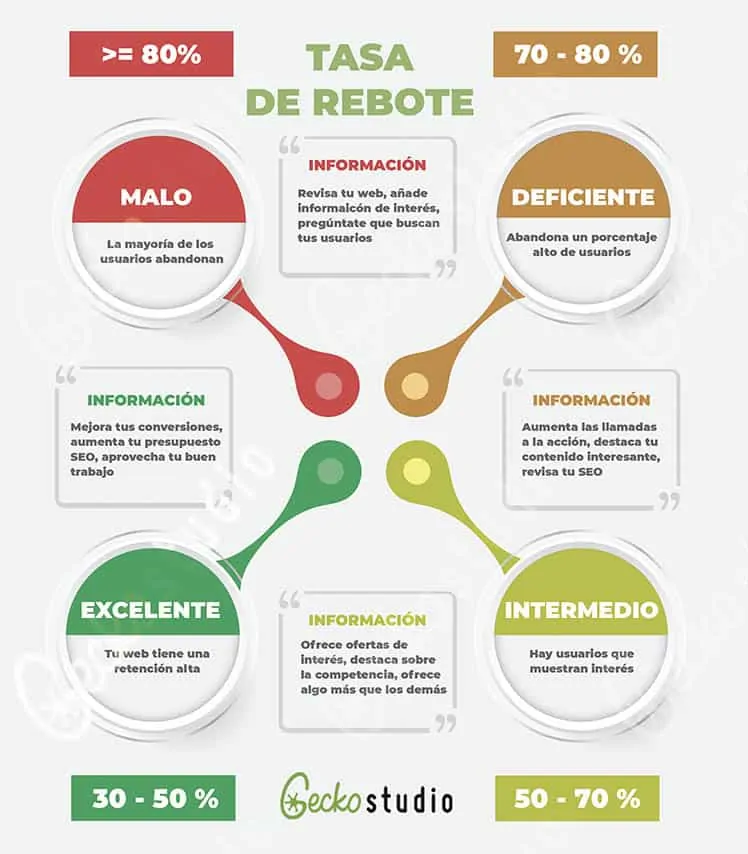
It depends on your sector, but as a general rule:
- 80% or more is very poor.
- 70-80% is poor.
- 50-70% is average.
- 30-50% is excellent.
If yours is above average, the causes can vary widely: slow loading, poor navigation, weak design, bad usability, no clear CTA and so on.
When a high bounce rate is not bad news
A high bounce rate is not always bad, and trying to cut it blindly can lead you to fix something that was not broken. Before bringing it down, find out what was happening in those visits. Some cases in which a high figure is normal:
- A page that answers the whole question. Someone searches for your opening hours or phone number, finds it and leaves satisfied. For Google and for you, that is a visit well served.
- A one-off blog post. A reader who lands on a specific article reads it and goes. That is not a failure, unless the article was meant to lead to another page and does not.
- Visits from a channel that does not fit. If an advert or social post brings in people who are not your customers, the bounce rate reflects the audience, not the website.
It does matter on pages that exist to convert, such as the contact page, the booking page or service pages, where people leave without doing anything.
That is why the site-wide average says very little. What is useful is to look at it by page and by traffic source. A home page with a high bounce rate on mobile and a low one on desktop points to a different problem from one with a high rate coming from a single advert.
One more nuance: in Google Analytics 4 the main measure is the engagement rate, and bounce rate is its mirror image. If you compare figures from different tools or different years, check that they count the same thing, because they do not always.
Only with that reading is it worth changing design, copy or speed.
How to reduce your bounce rate
Here are some of the most common mistakes behind high bounce rates and how to fix them.
Provide a better user experience
User experience covers every aspect of the end user's interaction with a company, its services and its products. On a website, it is the overall feeling a visitor has while using your site. A good experience means the site is not only easy to use but also visually pleasant, harmonious and responsive on every device (see our guide to responsive web design).
Optimise the placement of your CTAs
Most users decide within seconds whether they like a site, often with a glance at the visible area without scrolling. That area differs from one device to another. Optimise it by saying straight away what you are selling, with a clear call to action that is visible and stands out.
Improve your site speed
As noted, users make up their minds in the first few seconds. You do not want to waste them showing a blank page that is loading scripts and downloading content. A few extra seconds are enough to lose a lot of sales, so you need a fast site without internal errors.
To speed your site up, you can optimise images, add better caching and consider moving to a faster hosting provider. Have a look at our WordPress maintenance plans.
Around 50% of users leave a page if it takes more than 3 seconds to load.
Use high-quality images to catch attention
Images are another effective tool. Companies such as Google, once famous for a plain white background and minimalist design, now use high-quality images on their landing pages. You can find them on many royalty-free image libraries and use them as backgrounds, slides or inline images alongside a CTA.
Let your customers speak for you
Use customer testimonials to enrich your site. Turn them into success stories with real storytelling elements such as audio, video or illustrations. People love success stories and will want to know more.
Make your site readable
Most of the content on most websites is text, and it is a pity that this important part of the user experience is so often the most neglected. Make sure your text can be read easily on every device. If it is too small, users have to squint or zoom in, so use font sizes large enough for smaller screens.
Typography is not just about font size and colour. Make sure your text looks good: enough line spacing, padding and margins to keep it clean. Choose language that is easy to understand, in a normal conversational tone.
Show your credibility
Consumers are getting smarter. They do not decide at random: they examine everything on a site before choosing a product or service, and then check how far your company and your website can be trusted. Handing over money or information to a new company is not easy, and a new visitor does not know how good your business is or what reputation you have earned.
Show off third-party opinions of your product or services: mentions on other sites, magazines, media, influencers. Display your achievements, awards, certifications, quality scores and partners. And make your site secure and show the signs of it, so that users feel comfortable handing over a card number or personal details.
We hope these tips help you reduce your bounce rate and increase engagement and conversions.
Next steps
If you want a proper reading of your pages, request a free SEO audit, or see how our SEO consulting can help you analyse your needs in more detail.